
How to start the correct consult in Ascend (avoid duplicate consults)
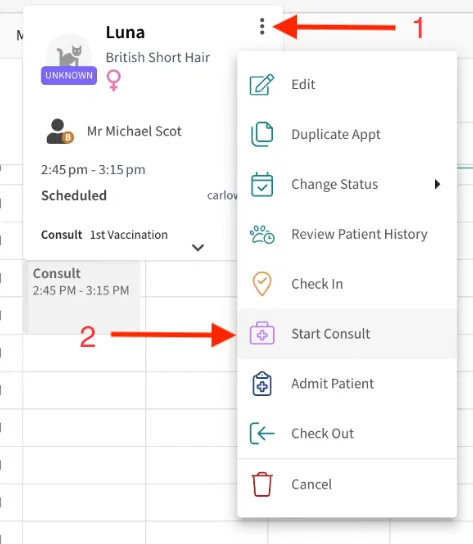
To avoid this, always start the consult from the appointment in the calendar.
Here’s how to start the correct consult in Ascend
Section titled “Here’s how to start the correct consult in Ascend”- Open Ascend
- Go to the Calendar
- Find the patient’s appointment
- Click the appointment
- Click the three dots
- Click Start consult, then consult from that screen.
Note: Do not create or open the consult separately from the appointment.
Section titled “Note: Do not create or open the consult separately from the appointment.”If the above does not work, please contact support@vetnotes.com